The Wizard Test Maker
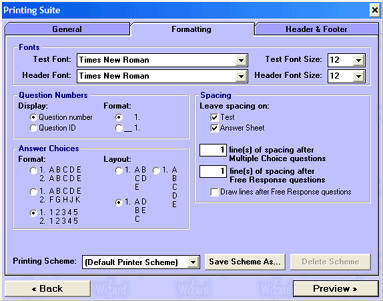
Formatting Options
Fonts
Test Font/Test Font Size - Here is where you choose your font type and size for test questions.
Header Font/Header Font Size - Here is where you choose your font type and size for headers and footers.
Question Numbers
Display - Allows you to print your test with a standard numbering scheme or by Question ID.
Format - Allows you to put a blank line before question numbers usually meant for answers.
Answer Choices
Format - Allows you to choose either letters or numbers and how they are displayed for your multiple choice answers.
Layout - Allows you to choose the positioning of your multiple choice questions.
Spacing
Leave Spacing on - Allows you to specify wether or not you wish to have free response lines, how many, and location.