The Wizard Test Maker
Header and Footer Options
Header
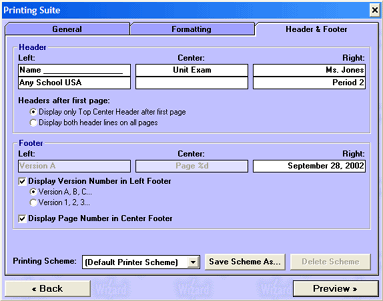
Left/Center/Right - Here you can enter your header data as seen below.
Headers after first page - The first page will have both lines of headers appear at the top, here is where you can choose wether this is the case on all pages.
Footer
Left/Center/Right - Here you can enter your footer data as seen below.
Display Version Number - If you are printing multiple versions, use this option to identify the different versions.
Display Page Number in Center Footer - Select this option if you would like page numbers at the bottom of every page.